
Vidu Q4 Prompt Guide: 6 Rules for Prompts That Actually Work
How to write Vidu Q4 prompts that follow your shot list: timecoded shots, reference image roles, dialogue, layered audio, slow-motion moments and a lock line — with real outputs and copyable prompts.
Vidu Q4 Preview generates picture and sound together, starting from reference images or a single starting image. There is no text-only mode, so every prompt does two jobs at once: it tells the model what each image is, and it directs the shot like a short script.
To find out what actually works, we generated four test clips on viduq4.xyz (8 seconds, 540p, 72 credits and roughly five minutes each), read the prompts behind Vidu's own Q4 showcase clips, and went through prompts that creators have published in Vidu's public community. The same six habits kept showing up.
The short version:
- Write a shot list with timecodes, not a paragraph.
- Give every reference image one job.
- Write dialogue as speaker + delivery + a short quoted line.
- Layer the audio: dialogue, sound effects, ambience, music.
- Give slow motion to one moment, and say how it ends.
- Finish with a lock line: what must not change, and what must not appear.
Rule 1: Write a shot list with timecodes
Q4 can cut between shots inside one clip, and it follows timecodes well. Vidu's own Q4 showcase prompt splits ten seconds into three timed shots joined by hard cuts. Ours does the same over eight seconds:
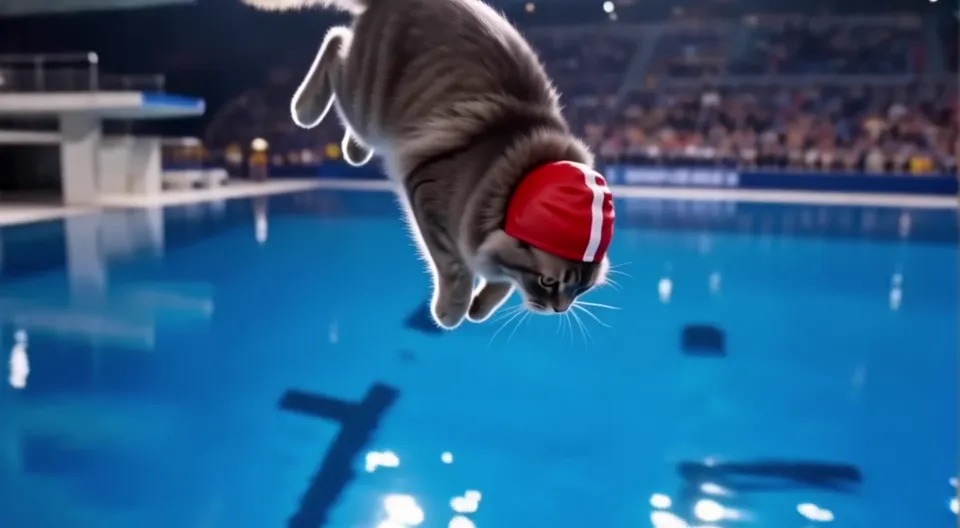
Live sports broadcast look, dramatic arena lighting. @Image 2 is the diving arena. @Image 1 is the cat athlete; keep its grey long fur and red swim cap with a white stripe exactly. Shot 1 (0-3s): low-angle shot, @Image 1 stands at the edge of the 10-meter platform, focused, tail still. Shot 2 (3-6s): slow motion, the cat leaps and executes a tight twisting somersault, water glittering below. Shot 3 (6-8s): clean rip entry with almost no splash; the crowd leaps up. Audio: an excited male commentator at 6s: "Unbelievable! A perfect entry!"; crisp splash; arena murmur rising to a huge roar. No music. No logos, no text on screen.
All three shots landed where we asked: the platform, the twist in mid-air, the entry.
What to do:
- Plan two or three shots per 8 seconds. More than that and each shot gets too short to read.
- Give each shot one action, plus its framing and camera move ("low-angle shot", "close-up", "tracking shot").
- Use "hard cut to" when you want a clean change of angle.
Compare a paragraph prompt with a shot list:
A cat dives from a high platform into a pool in a big arena, very cinematic and exciting, slow motion, crowd cheering.
Shot 1 (0-3s): low-angle shot, the cat stands at the platform edge.
Shot 2 (3-6s): the cat leaps into a twisting somersault.
Shot 3 (6-8s): clean entry; the crowd leaps up.
The first leaves timing, framing and order to chance. The second is a plan the model can follow.
Rule 2: Give every reference image one job
In reference-to-video you upload images and refer to them in the prompt as @Image 1, @Image 2 and so on. Say what each image is before you say what happens:
- "@Image 2 is the location."
- "@Image 1 is the strawberry girl, @Image 2 is the pineapple guy."
- "@Image 1 is the product can; keep its shape, colors and label text exactly."
Character images work best as a turnaround sheet (front, side, back on a plain background). Location images work best empty, with no people in them, so the model does not mix them up with your characters. There is a full walkthrough in How to Use Reference Images in Vidu Q4.
Rule 3: Dialogue = speaker + delivery + a short quoted line
Q4 generates speech and lip movement together. Prompts that worked for us follow one pattern: who speaks, how they say it, then the exact words in quotes.
Glossy stylized 3D animated comedy. @Image 3 is the location: a poolside patio at sunset. @Image 1 is the strawberry girl, @Image 2 is the pineapple guy; keep both character designs exactly as referenced, rendered in the same 3D animated style. Shot 1 (0-4s): medium shot of @Image 1, eyes watery, lip trembling, facing camera, mouth clearly visible. She says, hurt and shaky: "You said I was your only fruit." Shot 2 (4-8s): close-up of @Image 2, a sweat drop slides down his rind; he stammers, nervous: "Babe, the mango meant nothing. I swear." Fast dramatic zoom on his face at 7s. Audio: dialogue as written; a dramatic sting at 7s; pool water lapping, cicadas; soft reality-show tension synth. No violence, no text on screen.
What to do:
- Keep each line short, about nine words or fewer, and no more than one or two lines per 8 seconds.
- Frame speakers in a medium close-up, facing the camera, and write "mouth clearly visible".
- Don't stack other mouth actions (eating, laughing, drinking) on top of a spoken line.
- In a two-person scene, give each speaker their own shot and say who speaks first.
Rule 4: Layer the audio
Sound is generated with the picture, so describe it like a sound designer would, in layers:
- Dialogue: the exact lines, as in Rule 3.
- Sound effects: tie each one to something visible, with a rough time ("can crack at 2s", "crisp splash at 6s").
- Ambience: the background bed ("arena murmur", "cicadas", "quiet room tone").
- Music: describe genre, instruments and mood, or write "No music" if you don't want any.
Keep it to about five sound elements in total, so they don't fight each other.
Premium beverage commercial, macro ASMR style. @Image 2 is the set. @Image 1 is the product can; keep its shape, colors and label text exactly unchanged. Shot 1 (0-3s): extreme close-up of cold condensation droplets running down @Image 1; a finger pulls the tab. Shot 2 (3-6s): slow-motion pour into a glass of clear ice, fizz rising, a yuzu slice drops in. Shot 3 (6-8s): hero shot of the can beside the glass on the wet stone, slow push-in. Female voiceover, calm and crisp: "KUMO. Taste the cold." Audio: sharp can crack at 2s, glugging pour and fizz, ice clinks; minimal airy synth pulse; voiceover as written. Keep the can label legible and identical to the reference.
Rule 5: Give slow motion to one moment, and say how it ends
If you write "slow motion" without saying when, it's easy to end up with a clip that is slow from start to finish. The prompts with a visible change of pace all do the same three things:
- Pick the moment: a jump, an impact, a goal. Put it in its own timed shot.
- Say how it ends: "speed ramps back to normal", "then returning to normal speed", or a hard cut back to a wide shot at full speed.
- Put full-speed action around it. Slow motion only reads as slow next to something fast.
Vidu's own Q4 showcase prompt ends with a charge toward the camera where "the last second slows almost to a freeze". When we measured how much the picture changes from frame to frame in that clip, the final shot moved at roughly a third of the pace of the shot before it.
Our first cat test is a good example of what not to do: the slow-motion somersault comes right after a shot of the cat standing still, so there is no contrast and the change of pace is hard to notice. We're testing a full-speed run-up version and will publish the results.
Rule 6: Finish with a lock line
End the prompt with what must stay the same and what must not appear:
- "Keep the can label legible and identical to the reference."
- "Keep exactly four raccoons the whole time; none disappear, merge or change shape."
- "No logos, no text on screen."
In the KUMO clip above, the label stays sharp and correctly spelled in every frame we checked where the can is on screen. Listing what you don't want ("no captions, no extra people") works better than a long string of "don't".
A template you can reuse
[Style and look]. @Image 2 is the [location]. @Image 1 is the [character / product]; keep its [key features] exactly.
Shot 1 (0-3s): [framing], [camera move], [one action at full speed].
Shot 2 (3-6s): hard cut to [framing], [the key moment] [optional: in brief slow motion].
Shot 3 (6-8s): hard cut back to [framing], [the payoff, at normal speed].
Dialogue: [who], [how]: "[a short line]".
Audio: [sound effects with times]; [ambience]; [music, or "No music"].
Keep [what must not change]. No [what must not appear].
Common mistakes
- A paragraph instead of a plan. No times, no shots, so the model picks its own pacing.
- Images without jobs. Uploading three images without saying which is the character and which is the place.
- Long speeches. Twenty words of dialogue in an 8-second clip will not fit.
- "Slow motion" with no scope. The whole clip comes out slow.
- Real brands and celebrities. Make up your own brand names and characters.
FAQ
Does Vidu Q4 support text-to-video? Not in the Preview. It supports reference-to-video (several images, optional voice clips) and image-to-video (one starting image). See Image-to-Video vs Reference-to-Video.
How long can a prompt be? Vidu's API documentation allows up to 20,000 characters. The prompts in this guide are 600 to 900 characters, which is plenty for an 8-second clip.
Should I write prompts in English? All of our tests used English prompts. Vidu's own Q4 showcase prompt on vidu.cn is written in Chinese, so both work.
How much does a test clip cost on viduq4.xyz? 540p costs 9 credits per second, so an 8-second test is 72 credits. Test at 540p, then re-run your best prompt at a higher resolution.
Want more ideas to try? See 12 Viral AI Video Ideas You Can Make with Vidu Q4.
viduq4.xyz is an independent website and is not affiliated with Vidu or ShengShu Technology. All clips in this post were generated on viduq4.xyz with Vidu Q4 Preview.